
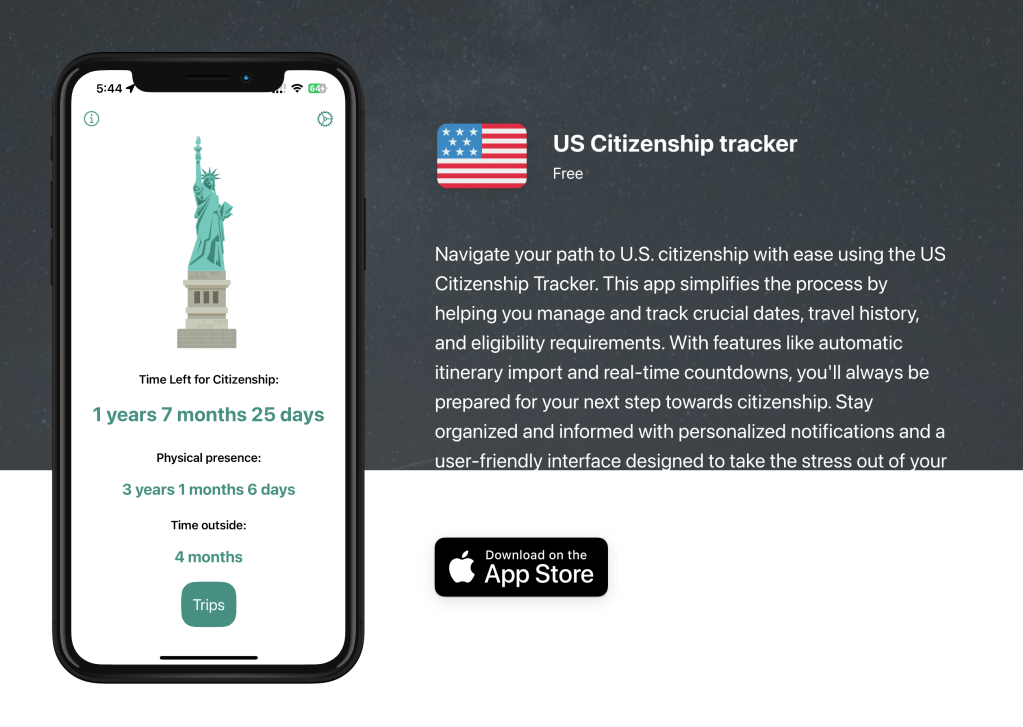
I recently made this app, US Citizenship Tracker, for a hackathon. The idea of the app is pretty simple: Track your time outside the USA and show you when you are eligible to apply for naturalization. Below are some iPhone screenshots of the app I published to the App Store.
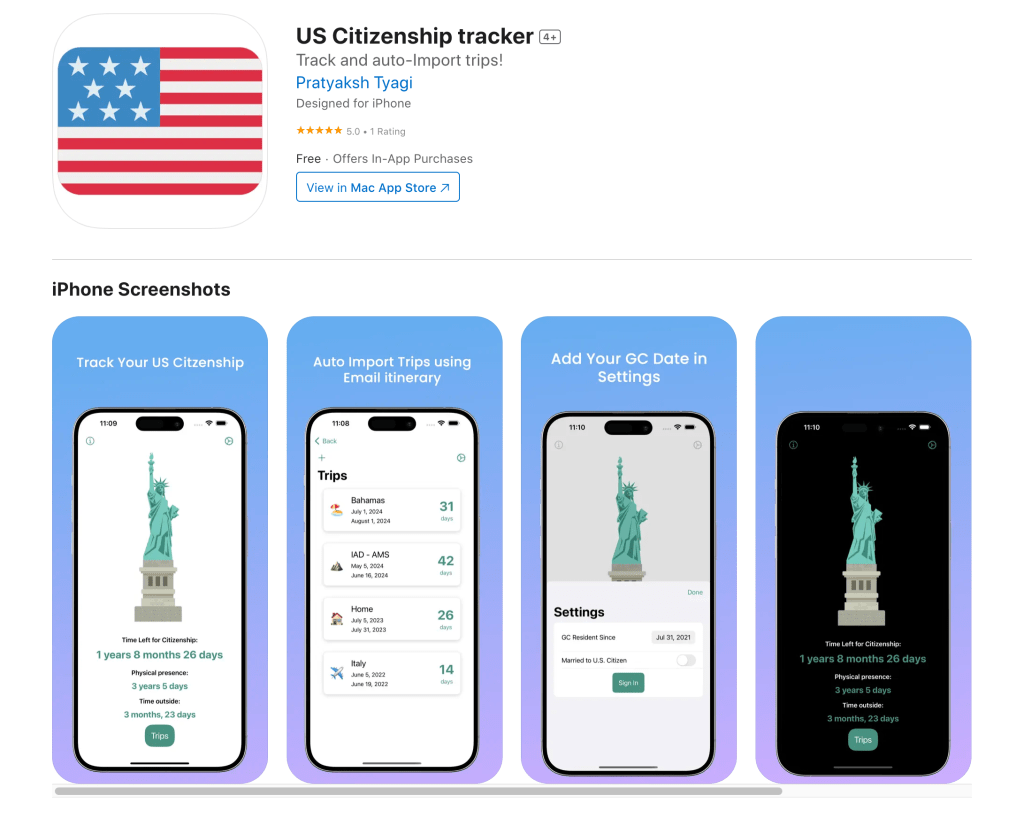
The need for this app was personal, as I needed something to keep track of my travel dates and also practice my rusty SwiftUI knowledge. I decided to make a paid feature, where you could auto-import your previous trips using itinerary emails onto the app. This was inspired by the iOS app Flightly, where you can track your flights, save your itineraries, and auto-import them. The way this works is by having the user forward their itinerary from their registered email address to a designated email inbox, from where it parses the content and gives the user a push notification when the auto-import is complete.
Auto Import Feature Architecture
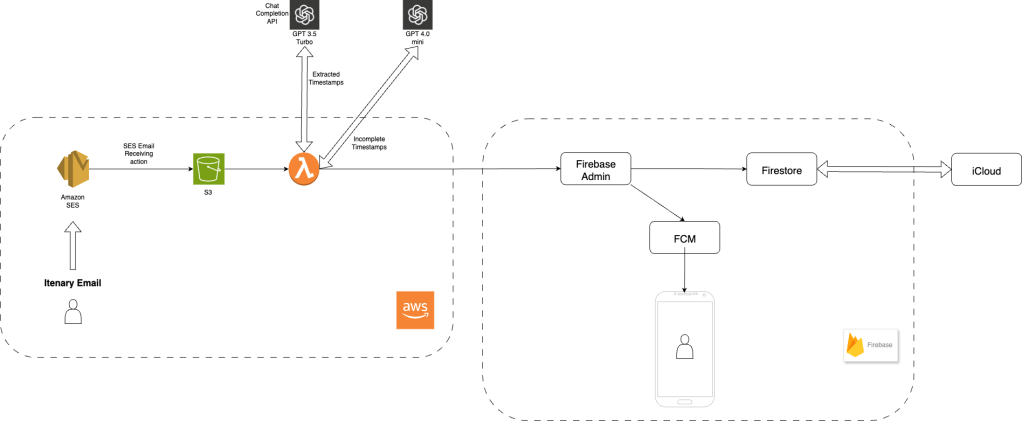
This was the architecture that I came up with while designing the auto-import feature. Initially, I wanted to use only AWS or Firebase, but as I experimented with Amplify, I realized it was best to use Firebase for the mobile side and AWS for handling SES email receiving and making the parsing lambda.
Starting off, we first have the user send us the itinerary email using their registered email. A check exists in the Firestore table to ensure the user is authorized before proceeding, so we don’t waste our resources and deny access if the user is not authorized.
Using Amazon Simple Email Service (SES) email receiving functionality, we can receive emails to our verified identity, which in my case is a domain that I bought from Namecheap. I point the MX record of the domain to SES. Using this setup, we can establish an email inbox on our domain. After that, we set a target of the SES to be an S3 bucket, which ensures that attachments are also added to the content. If I tried to directly invoke Lambda from SES, attachments never came through, so this step was necessary. After that, we use S3 actions to trigger a Lambda (email-parser-lambda), that handles all the major tasks.
Things email-parser-lambda does –
- First we get the email content , check the user’s email in our firebase auth table to see if they exist, then seperate out text, html and pdf content.
- Next step is to call GPT 3.5 Chat completion API like so –
 client = AsyncOpenAI(api_key=os.environ.get("OPENAI_API_KEY"))
        chat_completion = await client.chat.completions.create(
            messages=[
                {
                    "role": "system",
                    "content": "You are a travel agent. Extract the required travel details from the text and return them in JSON format. If any information is missing, return 'None' for that field.",
                },
                {
                    "role": "user",
                    "content": f"Extract the following details from the provided trip itinerary text in JSON format ( Return the Keys in PascalCase ):\n- DepartureAirport code\n- DepartureDate\n- Final Destination arrival airport code for departure leg ( use key FinalDestinationArrivalAirportCode for this) \n- Arrival date back at the initial departure airport( use key ArrivalDate for this)\n\nText:\n{text_content}",
                },
            ],
            model="gpt-3.5-turbo",
        )
Edge case of having no year in itenary
- After the JSON data is returned from the GPT-3.5 API, we have to ensure it is in the correct format and is complete. Sometimes, the itinerary does not contain the year; in that case, we have to look into the forwarded section of the email to fetch the year from when the original email was sent to the user.
- We make another call, this time to GPT-4.0 Mini, a more advanced model, to get the year from the forwarded email section and complete the timestamp.
- After that, we standardize the timestamp to an ISO 8601 format to ensure that we don’t mess anything up while parsing it on the SwiftUI side.
 client = AsyncOpenAI(api_key=os.environ.get("OPENAI_API_KEY"))
    try:
        chat_completion = await client.chat.completions.create(
            messages=[
                {
                    "role": "system",
                    "content": "You are a date parser. Convert the given date to an ISO format date string. If the date is incomplete or ambiguous, clearly state that it cannot be converted and explain why.",
                },
                {
                    "role": "user",
                    "content": f"Please convert this date to ISO format: {date_str}",
                },
            ],
            model="gpt-4o-mini",
        )
Sending extracted data off to Firebase
After the data is extracted successfully without any errors, we use Firebase Admin to update the user’s trips document with this updated data; all that data is stored in the database using base64 encoding.
We use a simple users collection, with each document having a trips array, fcmToken for the user, isPremium boolean, and freeTrialEnabled boolean.
When a user logs in using Firebase Auth, we update the FCM token on their document if it has changed. From our Lambda, we send a push notification to the user when the data is successfully updated in Firestore. This completes the flow of the auto-import feature.
Another fun challenge while building this was syncing everything to CloudKit and Firestore. As I don’t require a login to use the app, the data is synced to iCloud using the CloudKit API, but when a user wants to use the auto-import feature, they have to log in, which brought the complexity of making sure Firestore and iCloud data remain in sync, even if the user logs out or logs back in.
Analytics so far
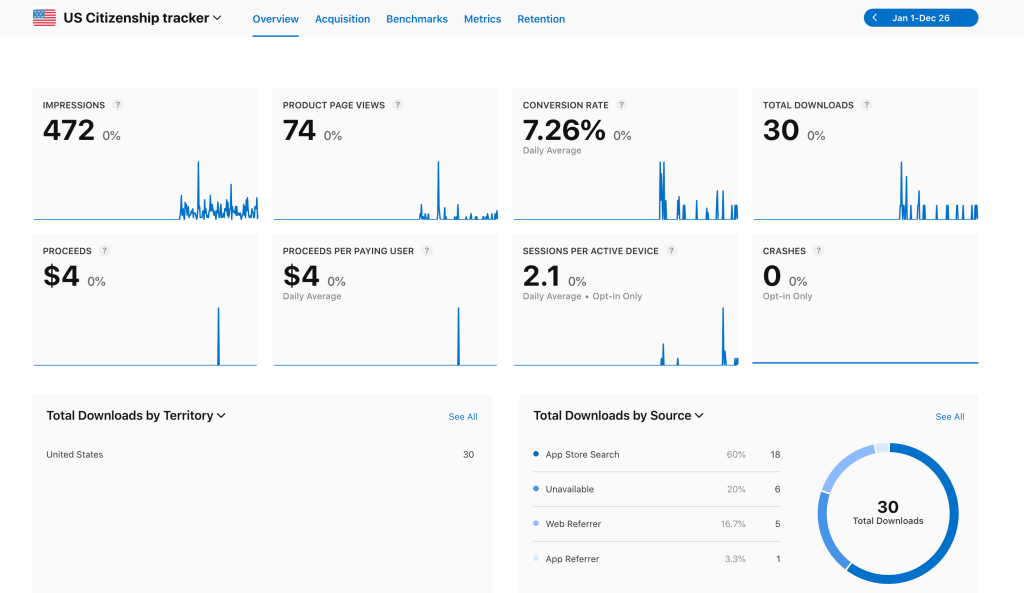
Lol, so 30 people found this very niche app that I made for myself to be useful. That spike was after i posted this on reddit. And that one sale is on my own device so yeah 0 sales. But, atleast I launched something at the end without procastinating.

 Pratyaksh's Blog
Leave a comment